
In Release 5.2.0, we introduce the following enhancements to the Validaide application:
Connecting Lanes and SOPs of different users.
An authorized forwarder can add its own lane to a shared SOP - Only Users assigned as 'External Contributor' and 'External Approver', can add lanes that they have created to a shared SOP.
- Previously if an SOP was shared with a forwarder they could view it but not add their lanes to it. With the release 5.2. authorized users are able to see a Configuration tab in the Shared SOP with the panel to add a Lane to the SOP.
- Lanes that have been added to the SOP are shared with the SOP owner. One shared lane can be added to only one shared SOP - so if a lane is added to a shared SOP, it can no longer be added to own SOPs.
- Linking lanes to an SOP can also be done to approved SOPs, without the need to restart the workflow (SOP state remains ‘Approved’).
- SOP and lane cannot be unshared until all the shared lanes have been removed by the authorized party from the SOP. Lanes that have been added are shown in the overview lane tab, in the map and in the SOP page, under ‘Lanes’.
- In the ‘Overview tab’ of an SOP, shared lanes and their workflow statuses are clearly indicated.
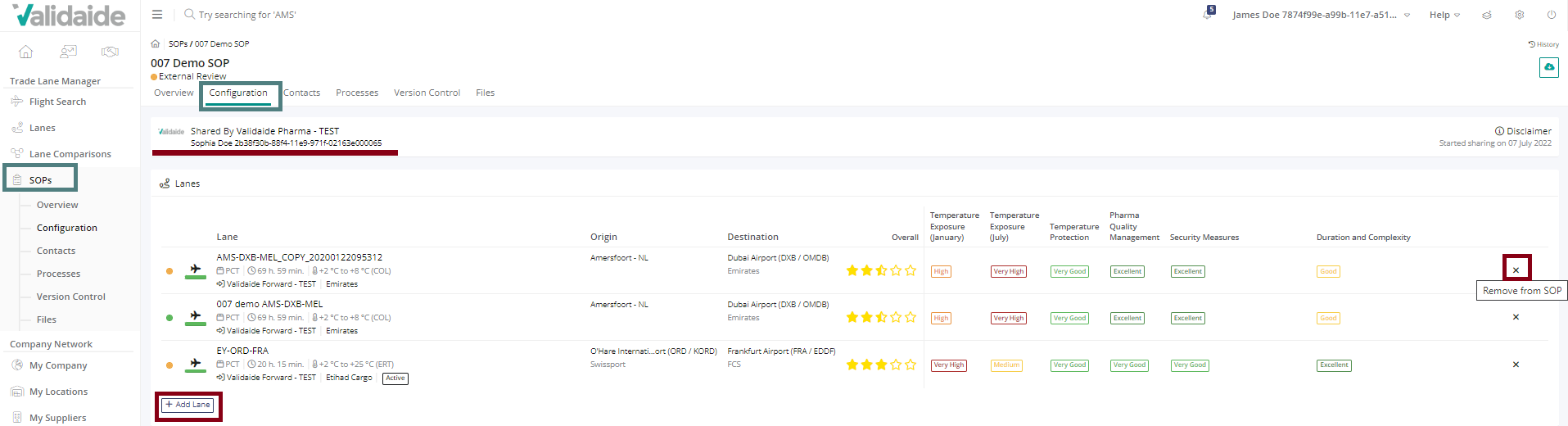
- An authorized user from a forwarder can remove its own lane from a shared SOP - Unlinking Lanes from an SOP can also be done to approved SOPs, without the need of restarting the workflow (SOP state remains ‘Approved’). Users from the forwarder assigned as ‘External Contributor’ and ‘External Approver’ can remove lanes from the shared SOP (the SOP owner users cannot remove lanes added by a forwarder). In the ‘Configuration tab’ of the shared SOP, the user is able to remove a lane from the SOP, the rest is disabled (‘Configuration tab’ and ‘Data Sharing tab’)
- SOP's responsible gets an email notification whenever the forwarder adds or removes lanes to/from a shared SOP - The responsible of the SOP receives a daily email update with all the lanes added and removed in that day by the external party. If no new lanes have been added and removed during the day, no email will be sent. In case one person is responsible for multiple SOPs and lanes have been added to more than one SOP, the SOPs responsible will receive only one email with changes made.
Various enhancements
- User is able to add a wholesaler company as a customer for lanes and SOPs – A user is able to select a wholesaler as a company type when selecting a customer for a lane and SOP. The company selected is visualized throughout the lane. The owner of the lane is able to share the lanes/SOPs with the wholesaler. Please note that the customer of the lane/SOP can be changed only if the lane/SOP has not yet been shared.
- Additional fields in the current lane JSON – New additional fields have been added to the lane JSON download.
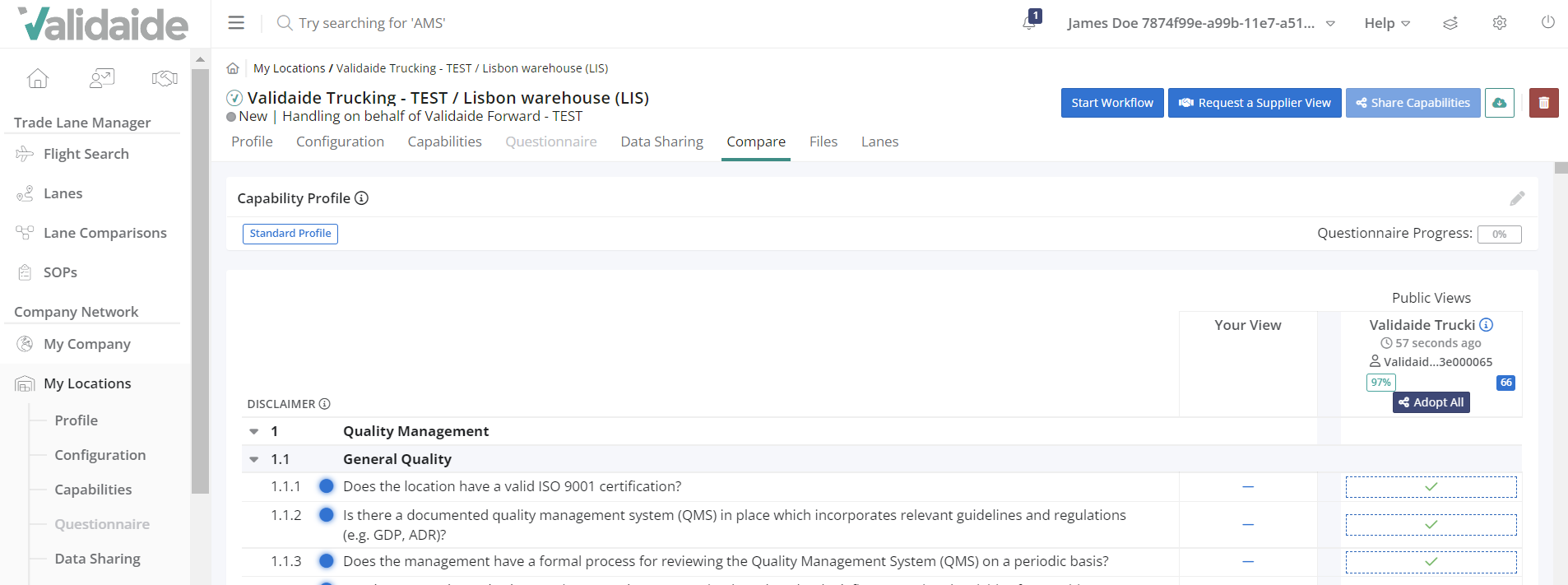
- ‘Adopt all’ button is available for publicly shared capabilities, when defining own view - When creating your own View, it is possible to adopt all answers from the Supplier and Supplier Locations that share their capabilities publicly. Adopt all button is now available if a company or location is sharing capabilities publicly, without sending a sharing request.
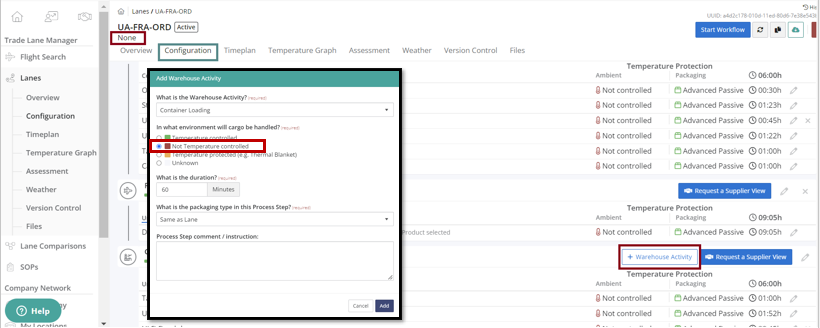
- Building a lane with temperature ‘None’ when adding a warehouse step "Not temperature controlled" is pre-selected - When building a lane with the booked temperature “None”, when adding a warehouse activity in the warehouse storage step, Validaide automatically pre-selects "Not temperature-controlled" as the environment in which the cargo will be handled.
- Wholesalers able to view lanes and SOPs - Wholesaler users are now able to view lanes and SOPs shared with them.
Bug fixes
- Users are now able to navigate to social media links of Validaide from icons in emails which wasn’t possible earlier.
- Earlier forecast graphs were displayed under the historical data of the weather tab in a Lane. This has been fixed. Forecast graphs are shown under the forecast data tab and historical data graphs are shown under the historical tab.
- Part of the Port Operator Module capabilities questionnaire was configured under the company questionnaire. This has been removed and now a user will not see Port Operator Questionnaire under the company questionnaire but under the container terminal location questionnaire.
- When the external approver in a shared SOP received an email about the fact that a shared SOP is about to expire, the link in the email directing a user to the shared SOP was not working. This has been fixed. The email link takes the user to the correct page.
- When Copying a Lane that had an assessment with populated data from Suppliers; Temperature exposure was copied as a part of the new lane but the Pharma Quality Measurement and Security Measures wear not copied as a part of the new lane. This has been fixed.
- For lanes with booked temperature none, if a user chose a ULD activity and removed it, the ambient temperature was shown as unknown instead of none for those steps. This has been fixed. Now for lanes with booked temperature none even if the user removes ULD activity and adds it again, the lane correctly displays none for ULD storage, ULD buildup/ breakdown.
Comments
0 comments
Please sign in to leave a comment.