
Overview
In Release 5.0.0, we introduce the following enhancements to the Validaide application:
Lane Manager
- Lane Configuration Editor
- A user can now modify the duration of individual phases in a GHA Step or Port Terminal handling phases.
- A user will be able to choose connecting flights with different airlines.
- A user can choose between 4 different transfer types while appending or prepending flights.
- Users can select frozen as booked temperature for road transport.
Capabilities platform
- Supplier management and classification - Users can add customized categories to locations and suppliers.
- Data export - administrators will be able to export capabilities data from the platform when this functionality is enabled for you.
Minor enhancements
- The Company workflow initial status is changed to New instead of Disabled.
- More information in downloads
- Supplier overview download includes a column to indicate tenant status.
- Task Overview Excel download includes information to distinguish between tasks associated with Lanes or locations
UI/UX improvement for modifying Suppliers to Company Location
Software architecture
Some Bug fixes
Lane Manager
Lane Configuration Editor
In this release, the user has been given the flexibility to overwrite the durations in the Lane Configuration. The application initially defines the duration for each Lane Step (either based on Capabilities, hardcoded, or derived from the total step duration).
A user can now modify the duration of individual phases in a GHA Step. A user sets the initial duration of the GHA Step (Origin / Destination) when adding a Flight step.
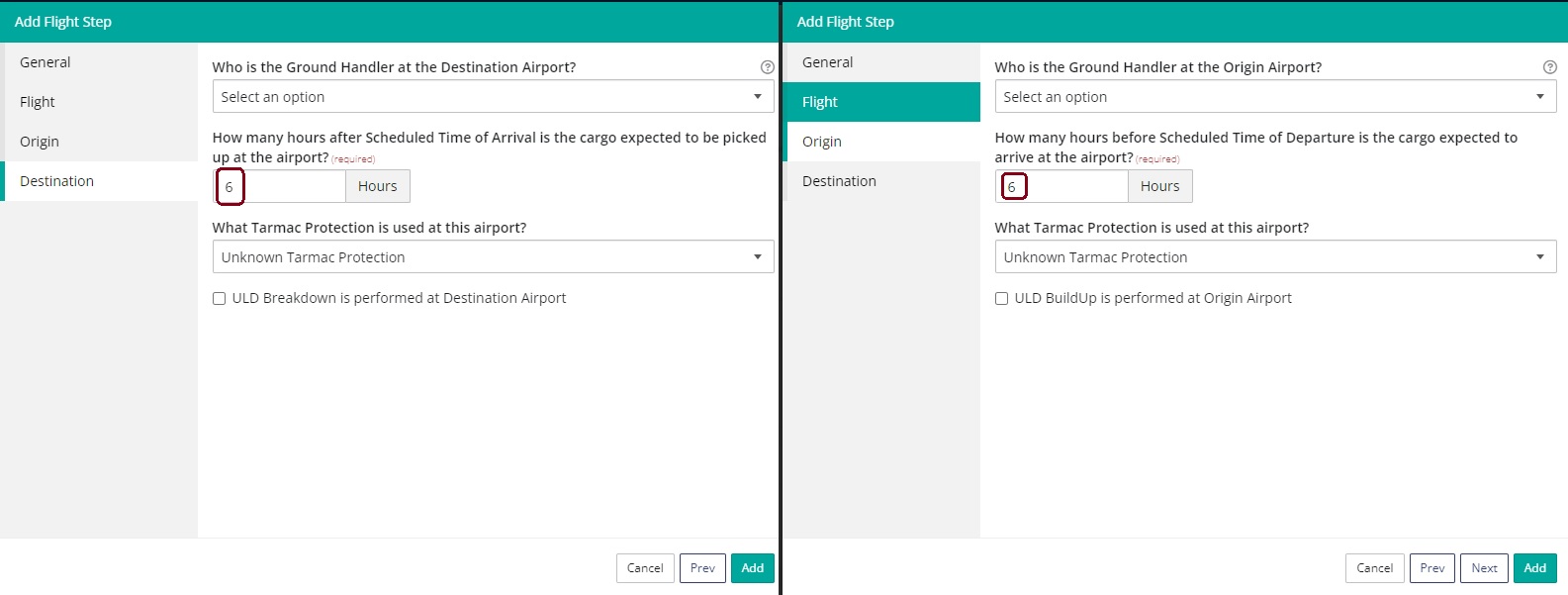
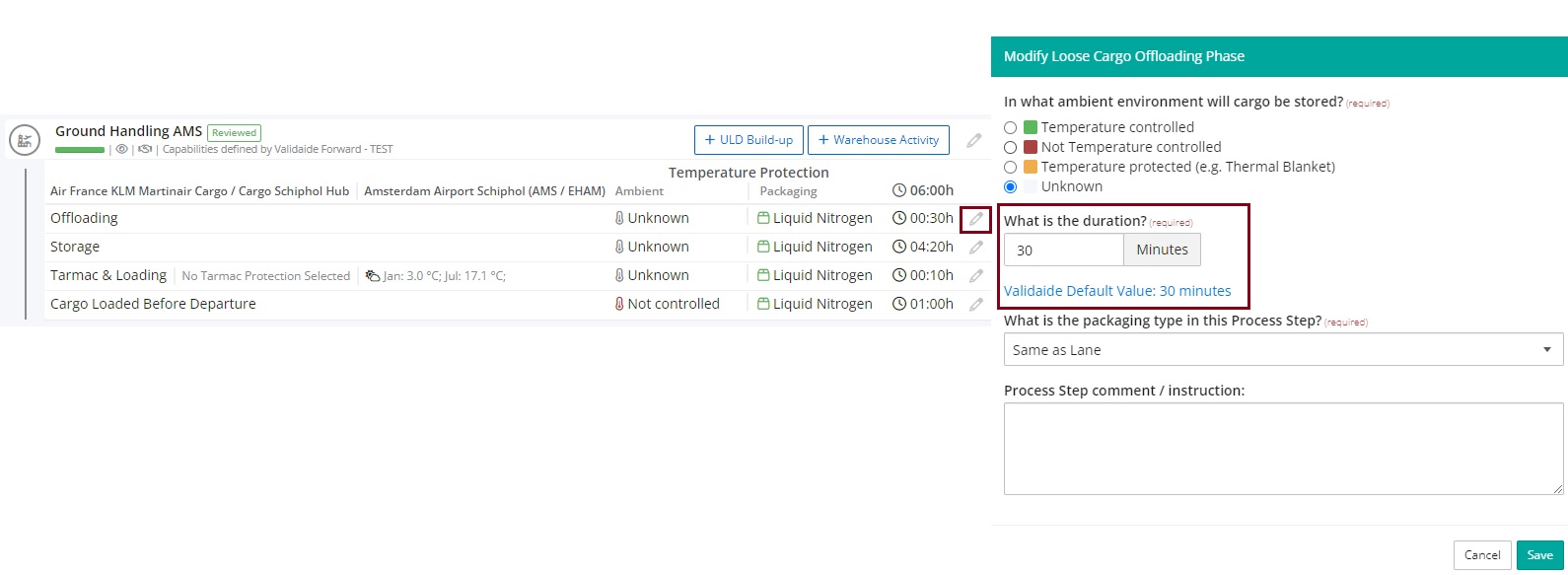
The user can then modify the duration of each Phase in a GHA Step. When a user modifies a duration of a Phase, the duration of total GHA Step is adjusted accordingly.
For the Offloading / Loading / ULD Build-up / ULD Breakdown, the Modify Form indicates the system default value.
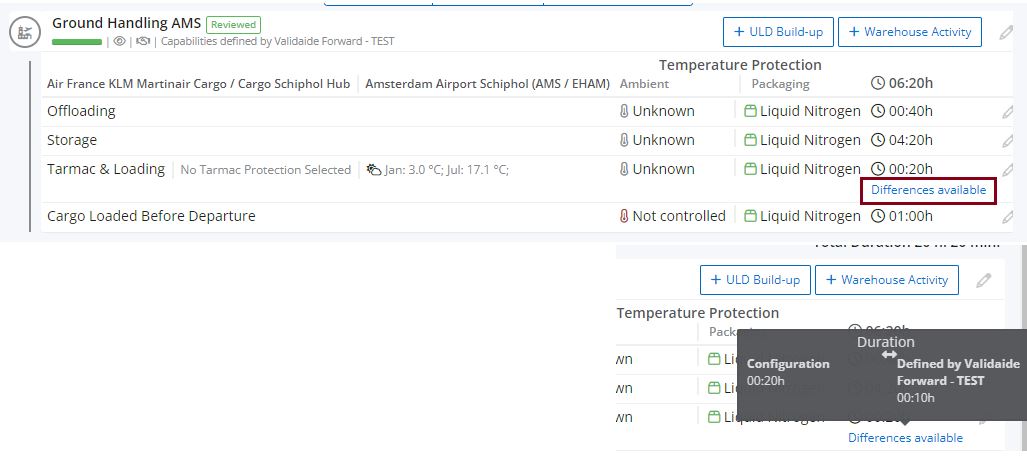
If the user overrules the duration for a Tarmac phase, there is an indication "Differences Available" in the Lane Configuration.
Similarly, A User can modify the duration of Origin / Transfer/ Destination for Port Handling Steps as well. When a user modifies a duration of a Phase, the duration of the total Port Handling Step is adjusted accordingly. The system indicates the default value per phase if there is any.

ULD activities at origin and destination
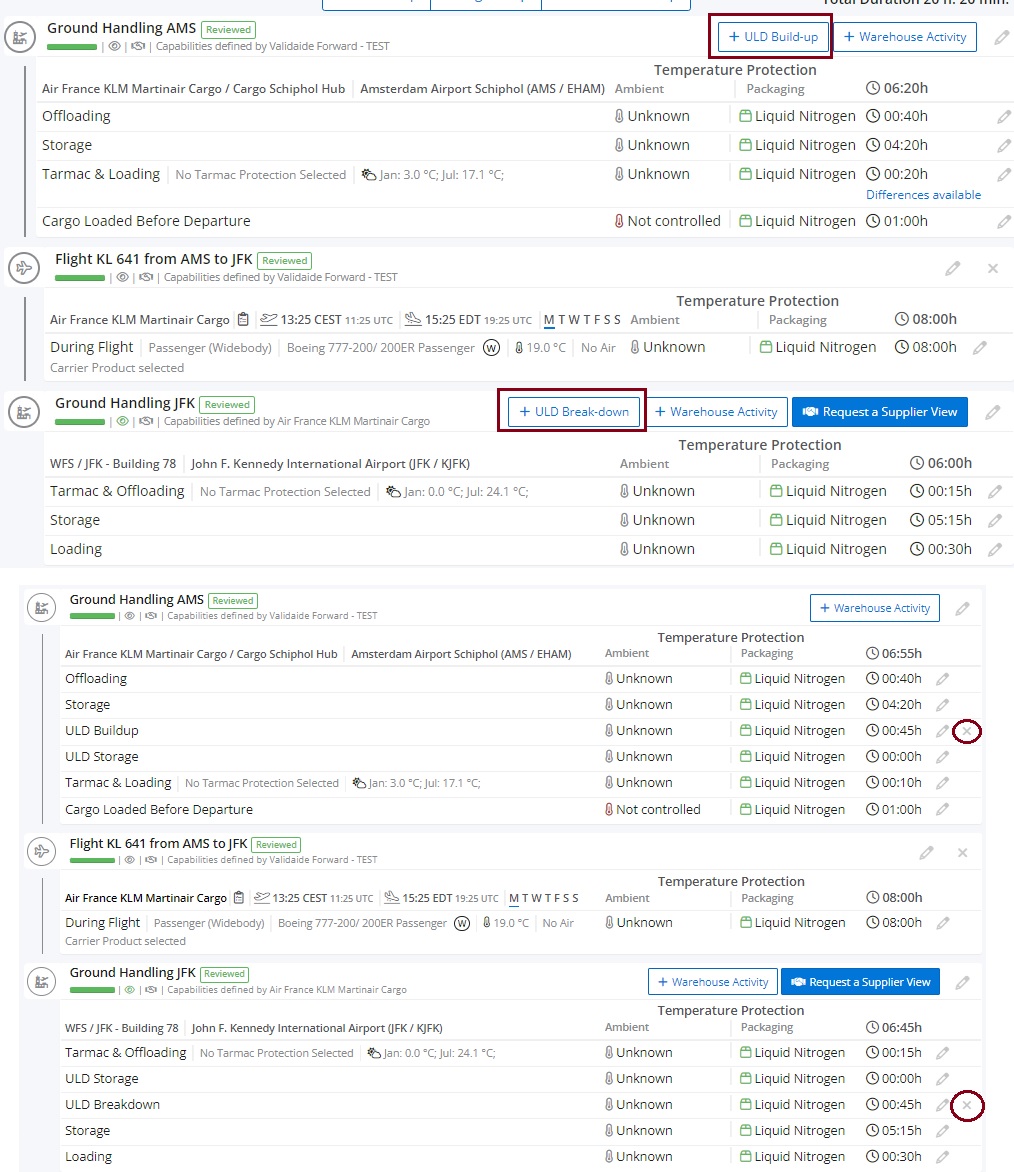
It is now possible to indicate whether ULD build-up or break-down is performed at the origin and Destination Airport in the origin and destination tab of the Create Lane/ Add Flight step form.
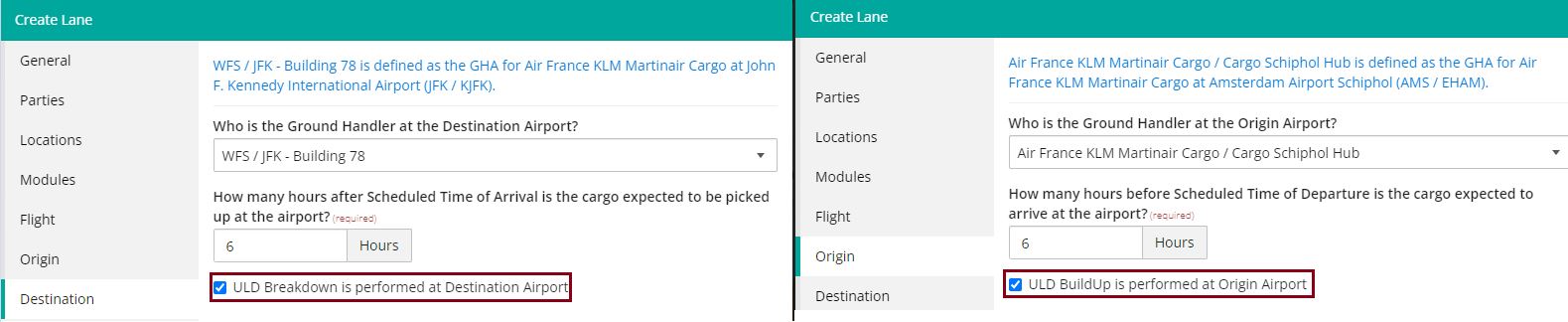
Please note our wizard form selects this on default and user can uncheck it unless the Lane Packaging is Active Container, Advanced Passive or Liquid Nitrogen, then the option for ULD Build-up or ULD Breakdown is unchecked by default.
It is possible to add or remove ULD activities at a later stage in the configuration screen.
Connecting Flights with different airlines
It is now possible to add connecting flights with different airlines if both airlines have the same GHA at the connecting location.
Transfer Types
A user can indicate the type of connection for the flight transfer. When the user adds a Connecting flight (prepend or append), the user must first select the Connection Type from the following list:
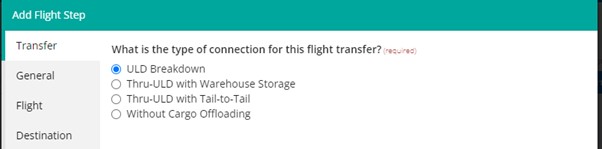
- Connection with ULD breakdown and build-up
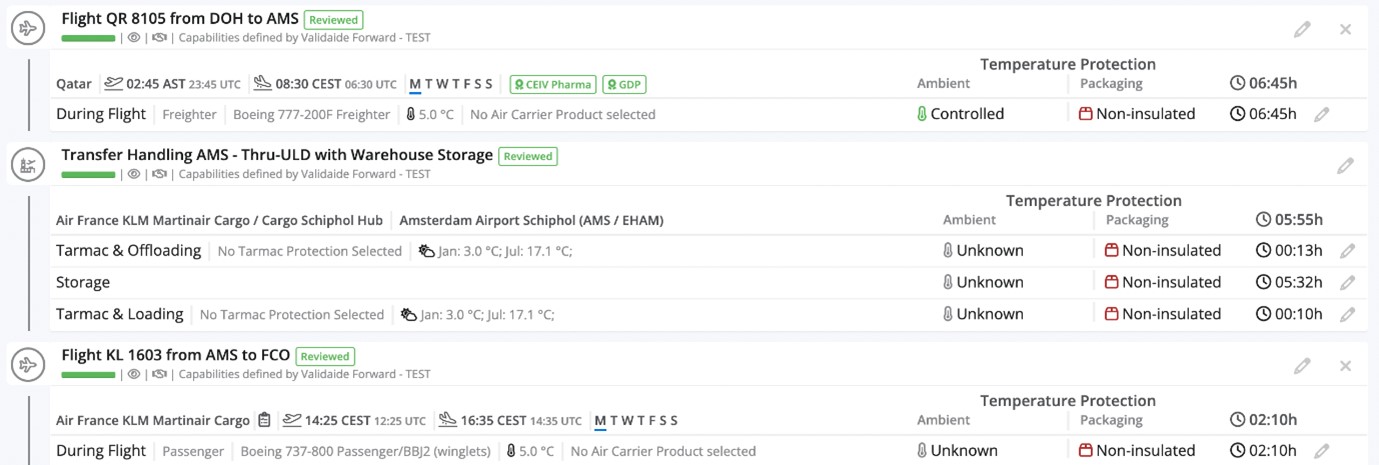
- Connection for thru-ULD with warehouse storage
- Connection for thru-ULD with tail-to-tail transfer
- Connection without cargo offloading from aircraft
Based on the connection type, Validaide will search for flights with the indicated minimum connection time, and adjust the phases in the Transfer Handling accordingly.
The functionality per Connection Type is as follows:
Connection with ULD Breakdown
This is the current scenario in Validaide, with ULD Break-down and Build-up.
- Minimum Connection Time: 3 hours
- Process Steps at Connecting GHA:
-
- Tarmac and Offloading
- ULD Storage
- ULD Break-down
- Storage
- ULD Build-up
- ULD Storage
- Tarmac and Loading
Connection for thru-ULD with warehouse storage
In this scenario the ULD is not broken down, so no ULD break-down and build-up and connecting GHA.
- Minimum Connection Time: 3 hours
- Process Steps at Connecting GHA:
-
- Tarmac and Offloading
- ULD Storage
- Tarmac and Loading
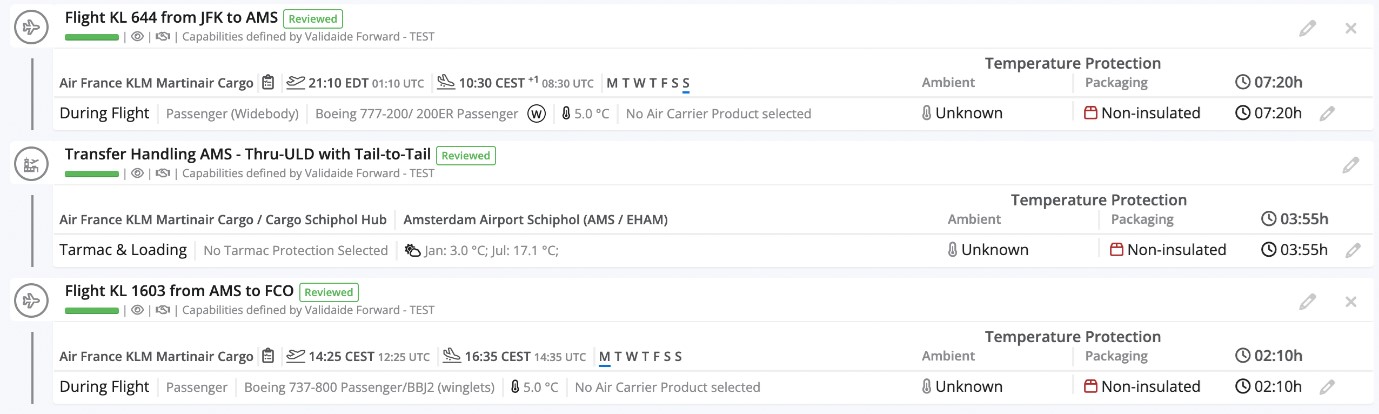
Connection for thru-ULD with tail-to-tail transfer
In this scenario, the ULD stays on the tarmac and is not moved into a warehouse. The minimum connection is 1 hour.
This connection type is not possible for RFS flights.
- Minimum Connection Time: 1 hour
- Process Steps at Connecting GHA:
-
- Tarmac and Loading
Connection without cargo offloading
This is an exceptional scenario, in which the ULD is not offloaded at all. So this connection is only possible for connecting flights with the same aircraft. It is assumed that the doors are opened for loading/offloading of cargo, so affected by outside temperature.
In addition, RFS flights are not possible for this connection type.
- Minimum Connection time: not applicable
- Process steps at Connecting GHA:
-
- Cargo loaded before departure

Frozen as booked temperature
Users can now select frozen as booked temperature for road transport just like it was possible while creating ocean Lanes.
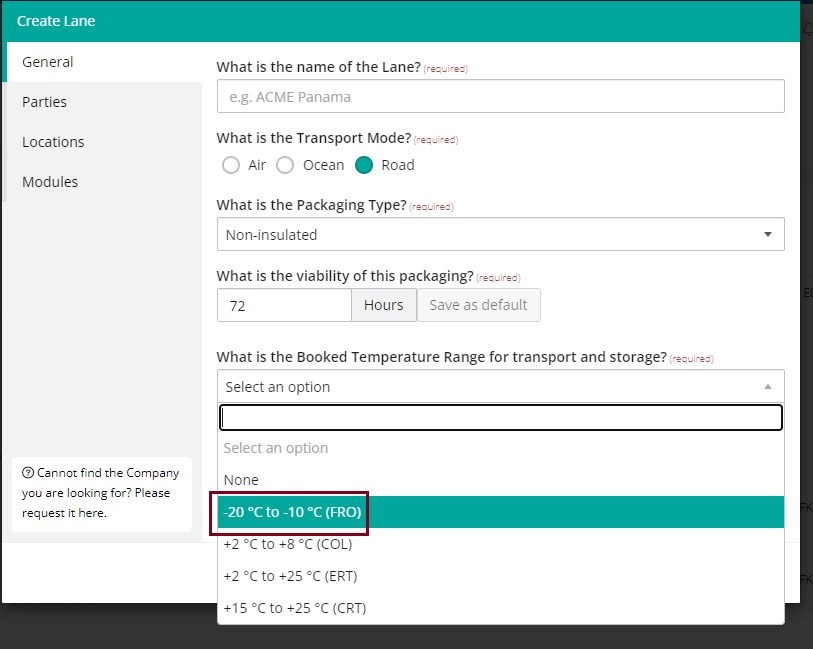
Please note it is not possible to choose Frozen for Air Lanes.
Capabilities platform
Data export
- Validaide can enable and disable the GHA Capabilities Extract at the backend.
- A new menu item named “Data Exports” has been added for tenant administrators in the administrator menu for massive exports.
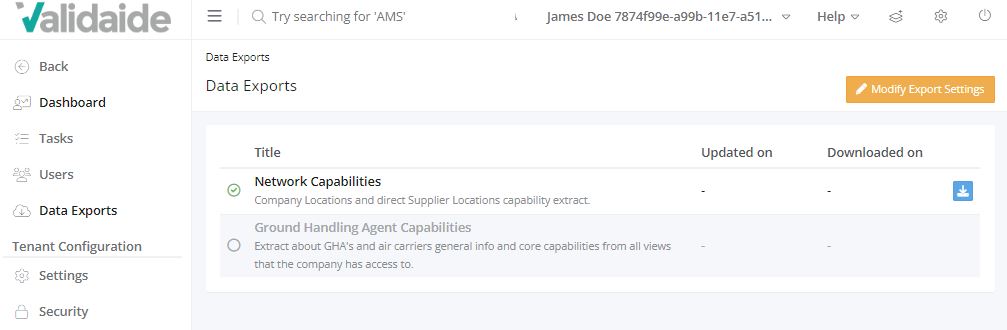
Please note that by default, the Tenant will have all the exports disabled. They need to click “Modify export settings” and enable which exports they want. Ground Handling Agent Capabilities are only available if enabled by Validaide.
Once enabled it takes a few minutes to generate the downloads. Please refresh the page in a few minutes to download the Zip files. The Network Capabilities may take around 4-5 mins to generate and the Ground Handling Agent capabilities may take around 15-20 mins.
The Network Capabilities download button under My Locations does not have JSON files anymore, only tenant administrators can download them from the data exports menu in the administrator settings.
Supplier management and classification
An administrator user can change the description of the classification for locations as well as suppliers.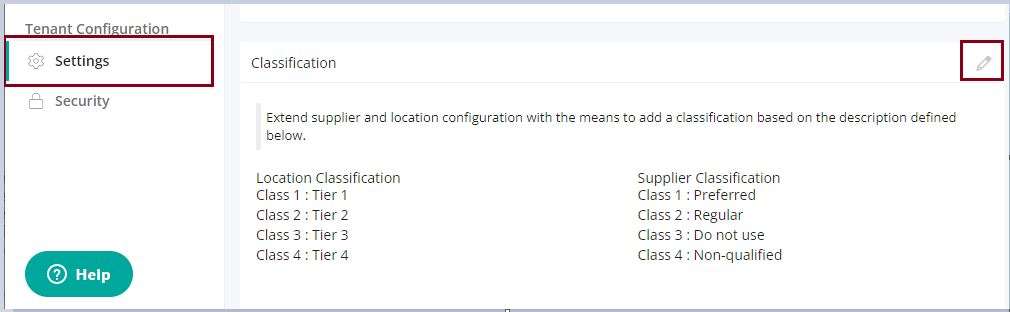
An administrator can go to the settings menu of the tenant configuration under Administrations. Here the administrator user can modify the description for location classification and supplier classification.
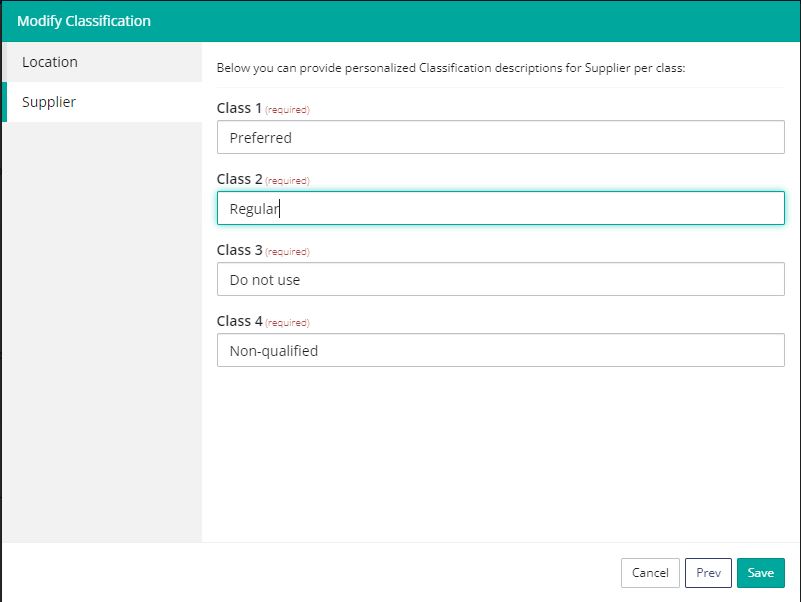
Please note, a user is not able to enable/disable this functionality anymore. The functionality is always enabled by default.
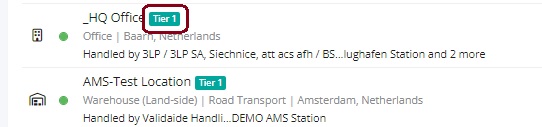
When a Location Classification is selected, the Classification Description is visible next to the name on the Suppliers and Locations overview.
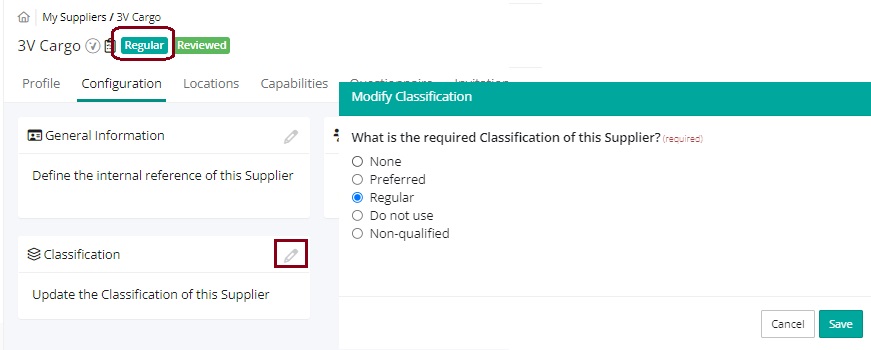
A User can modify the Classification type, under Configuration - Classification. When a user chooses a supplier classification it is visualized in the header beside the supplier's name.
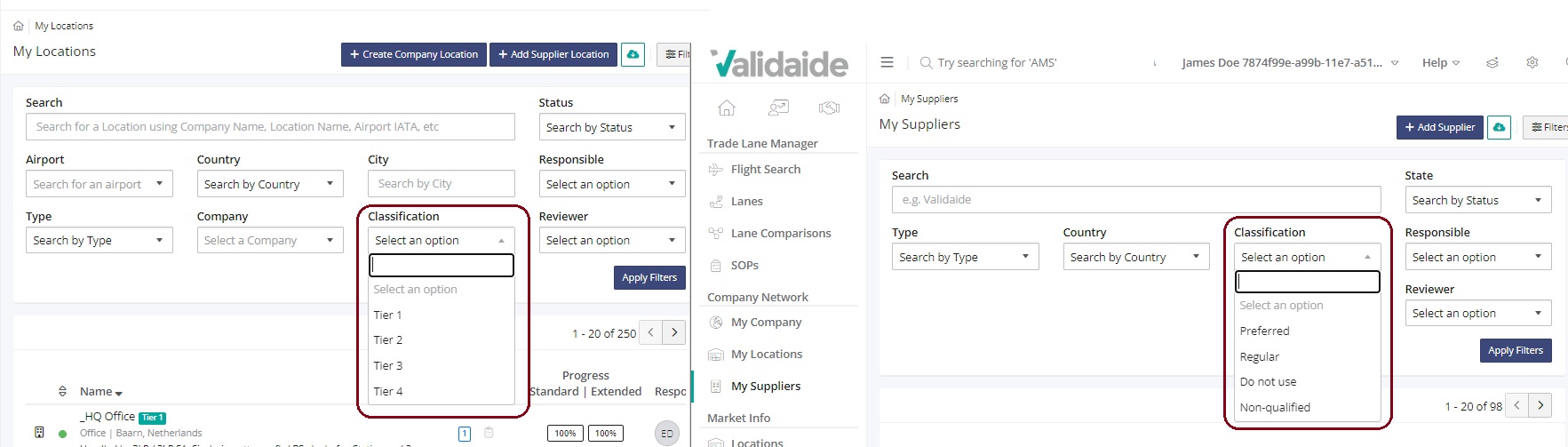
A user is also able to filter suppliers and locations by classification descriptions in the My Locations' and My Suppliers' overview.
Minor enhancements
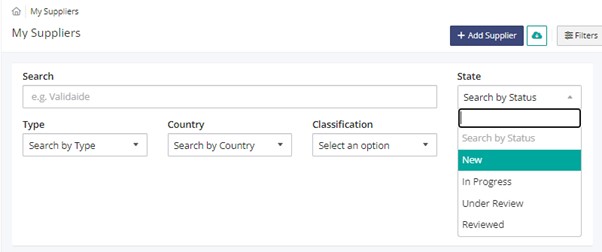
A Company workflow initial status is changed to New instead of Disabled.
More information in downloads
In the Supplier Overview download, there is now a column to indicate if the company is active/ in-active on Validaide.
Task Overview Excel download includes information to distinguish between tasks associated with lanes or locations.
UI/UX improvement for modifying Suppliers to Company Location
The Warehouses Tab in the 'Modify Suppliers' form in the Suppliers panel of the Company Location configuration has been made consistent with the Road Suppliers tab.
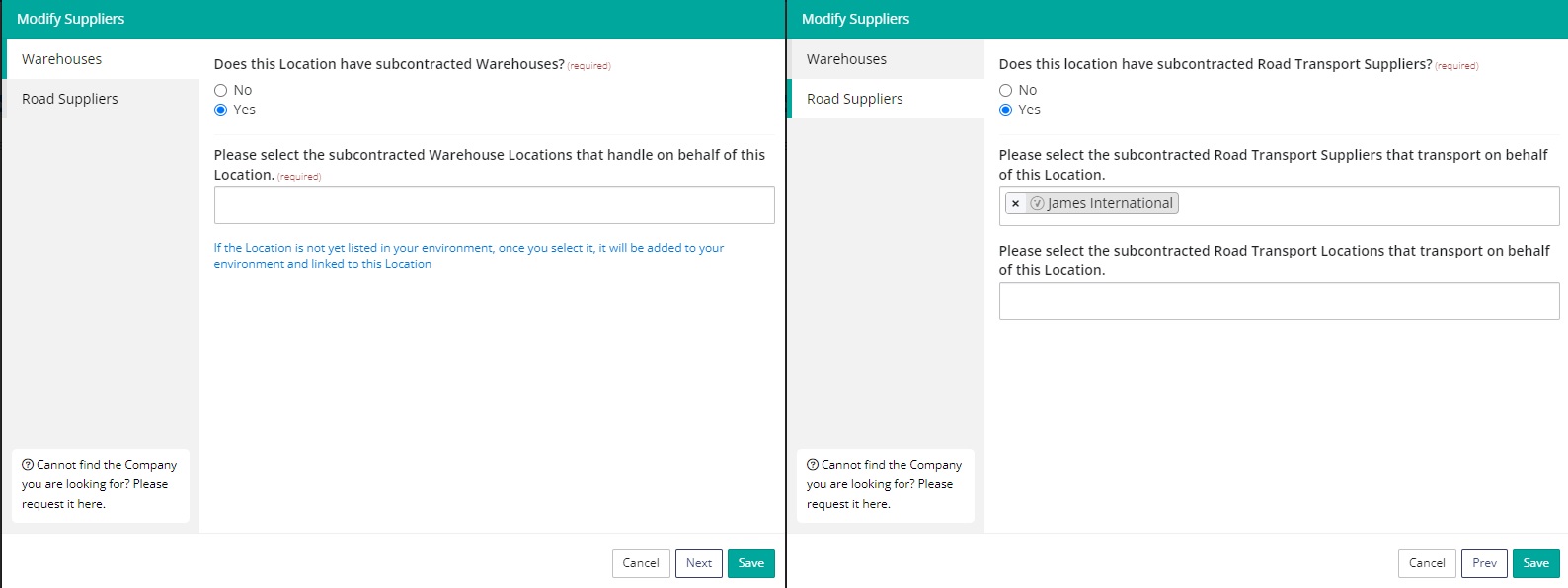
Software architecture
Release 5.0.0 is classified as a major release, as it contains two significant architectural changes.
- The first architectural change involves the lane architecture. Over the last couple of years, the requirements for the Lane Configuration (in particular the warehouse processes and transfer types) evolved in such a way, that they required more flexibility. This resulted in a partial rewrite of the lane architecture.
- The second architectural change involves the generation of data exports (Network Capabilities, GHA Capabilities) that originally were created ‘on the fly’ based on user input. This was no longer tenable from a performance point-of-view, and thus data exports are now generated by timed execution of scripts (so called cron jobs).
Bug fixes
- The SeaRoutes API was returning Longitudes of more than 180 degrees, which should not be possible. This has been fixed.
- Wrong user was pulled into the task email. Now Responsible user name is correctly displayed in the email received by the Reviewer.
- Modify User Roles: When modifying a user role assigned to a user that is assigned already as a Responsible/Contributor/Reviewer, the form breaks. This has been fixed. Also, when switching roles between Responsible and Reviewed, the form breaks. This has been fixed.
- When there was a location in Expired status, the map page of the Company was breaking. This has been fixed.
- Coyne Airways flights were showing the logo from Jeju Air. Now a system administrator can configure an airline's logo.
- 'Start Workflow' button returned an error in some cases when having received a Sharing Request. This has been fixed.
- Not all Supplier Locations were included in the Network Capabilities download. This has been fixed. All existing locations of a company are included in the Network Capabilities Download - both Company Locations and Supplier Locations.
- The Weekly Report email included extra lines and the website in the email was not updated. This has been fixed.
- When a packaging had not been selected in a lane, a warning appeared that the Packaging Type of the Product is not compatible with the lane. This has been fixed.
- When commodities were unselected in the Configuration, their sections were still part of the questionnaire. This has been fixed. Also, for new companies: Perishables and Live Animals are unselected by default.
- The Supplier Configuration form did not allow non-road locations to be configured on the supplier side which caused inconsistencies. This has been fixed. The supplier's tab is deleted from its general configuration.
Comments
0 comments
Please sign in to leave a comment.