
Overview
In Release 4.7. we introduce the following enhancements to the Validaide application:
Capabilities platform
-
- Review Cycle for Company Location capabilities
- Data Sharing Enhancements
- Capability data status information for locations
- An icon in My Company - Profile tab to indicate Public or Private capability status.
- A user can see which tenants have added its company as a supplier
- Trucking companies will be able to choose between private and public sharing
- More information in downloads
- Company Location overview download includes Road freight field
- The Supplier overview download, now also includes how many lanes that supplier is being used in
- The location overview download, now has a column to indicate how many lanes a location is being used in and also Road Freight Capabilities configuration.
- The user overview download now includes a column for the user’s internal location reference number.
- Updated Location Download in Excel
- Possibility to select supplier locations and company locations as subcontracted Road Freight suppliers
Lane Manager
-
- A new product category ‘Cell and Gene Therapy’ and a new packaging type ‘Liquid Nitrogen LN2’ has been added.
Enhanced User Management
-
-
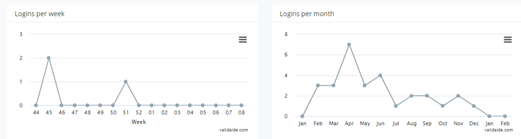
- An administrator can see number of logins per month for each user
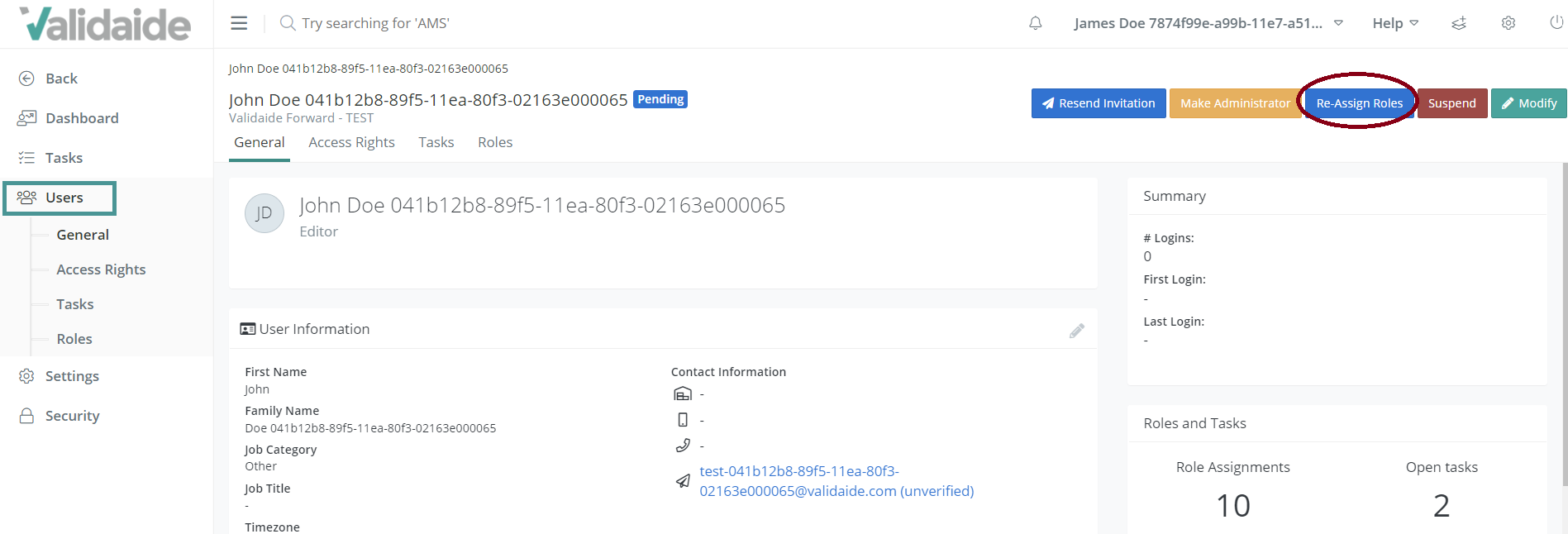
- An administrator can reassign roles and tasks with or without suspending a user.
- Update the issued-on date when a task is re-assigned
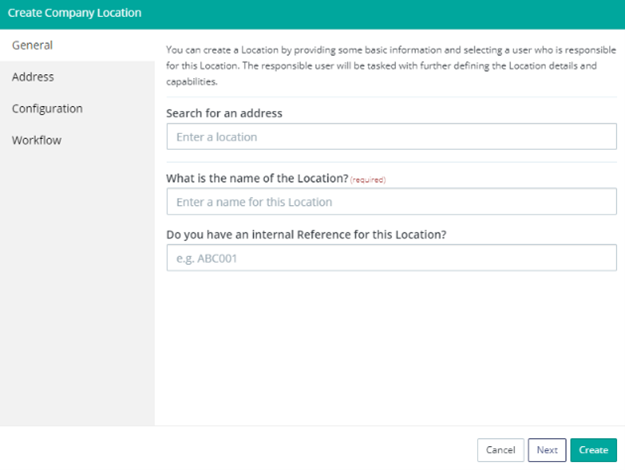
- User friendly enhancements when creating company locations.
- Updated the Expired Company / Location Capabilities email
-
Technical upgrade
-
- We are now using Symphony 4 instead of Symphony 3 framework
Some bug fixes
Capabilities platform
Review Cycle for Location capabilities - A Review Cycle will serve as a checkpoint to ensure that the defined location capabilities correctly represent its current capabilities. This ensures that the capabilities are updated and not stale. It is an opportunity for data providers, through triggers, to timely update their data.
An authorized user can define a Revision Period. The user can select a revision period between 6 to 24 months; the default is 12 months.
One month before the defined revision period is reached, the status of the company capabilities changes to "About to Expire" from the "Reviewed" state. At the end of the revision period, the state automatically changes from "about to Expire" to "Expired" State. The authorized user gets a task and a notification that the location capabilities need to be updated.
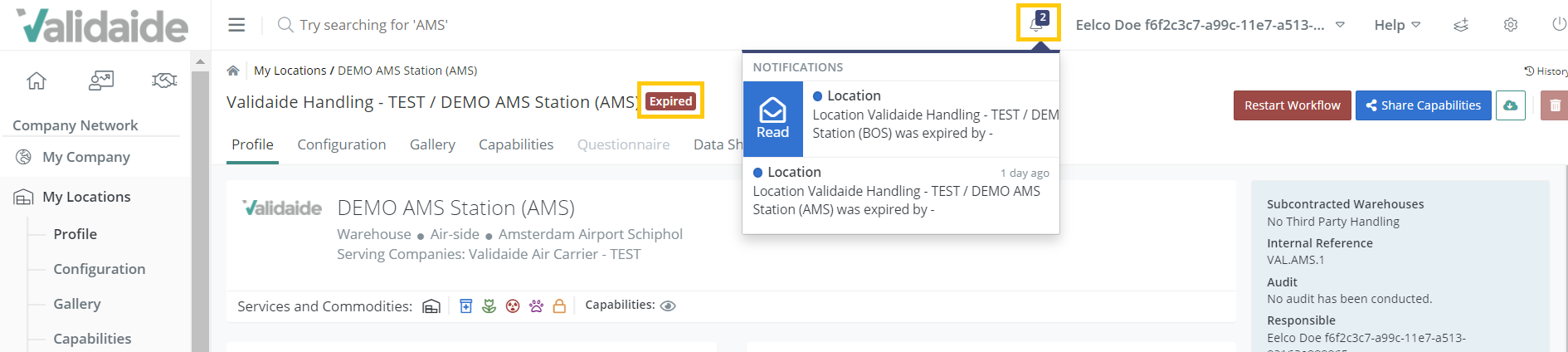
Please note that the "Expired" state does not mean that the data is unavailable, it means there is a possibility it might not be up to date. Hence, if expired location data is used in a Lane, the data will be available in green but with a warning. This is only visible on the configuration screen.
Data Sharing Enhancements
- Capability data status information for locations – When going to My Locations and selecting a supplier location, now it is possible to see the capabilities status information from the location owner for the selected location. This information is also visible for Supplier Locations and in the Market Info - Location Profile page. Similar to a supplier profile, it is also indicated if data is Visible (Public/ private), Handshake (if there is a sharing request), Status of the Capabilities as defined by the company, and what percentage of the questionnaire is filled in.
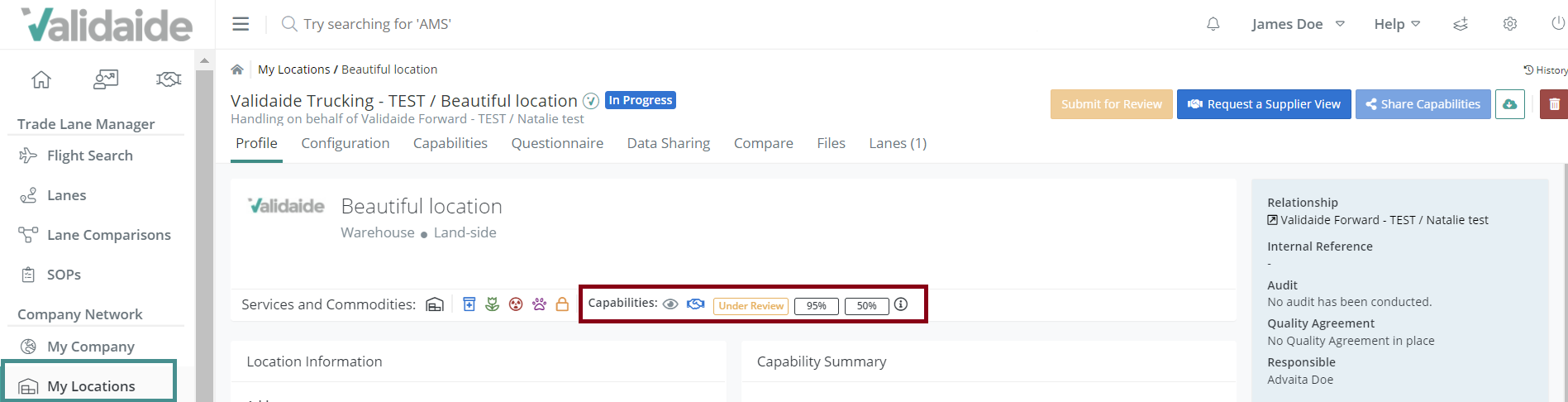
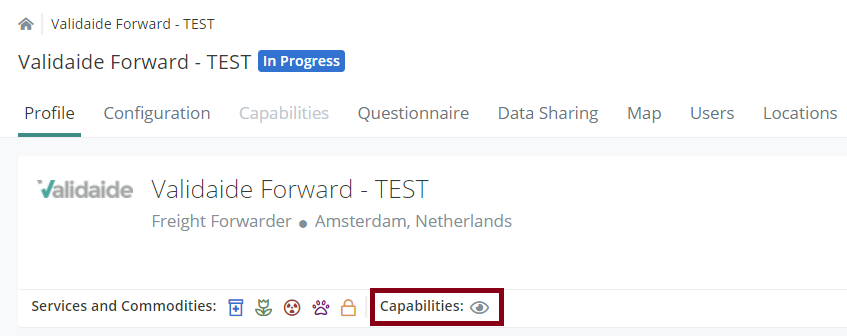
- An icon in My Company - Profile tab to indicate Public or Private capability status – In the new release an additional icon has been added under My Locations – Profile tab to clearly indicate if the company has Public or Private sharing.
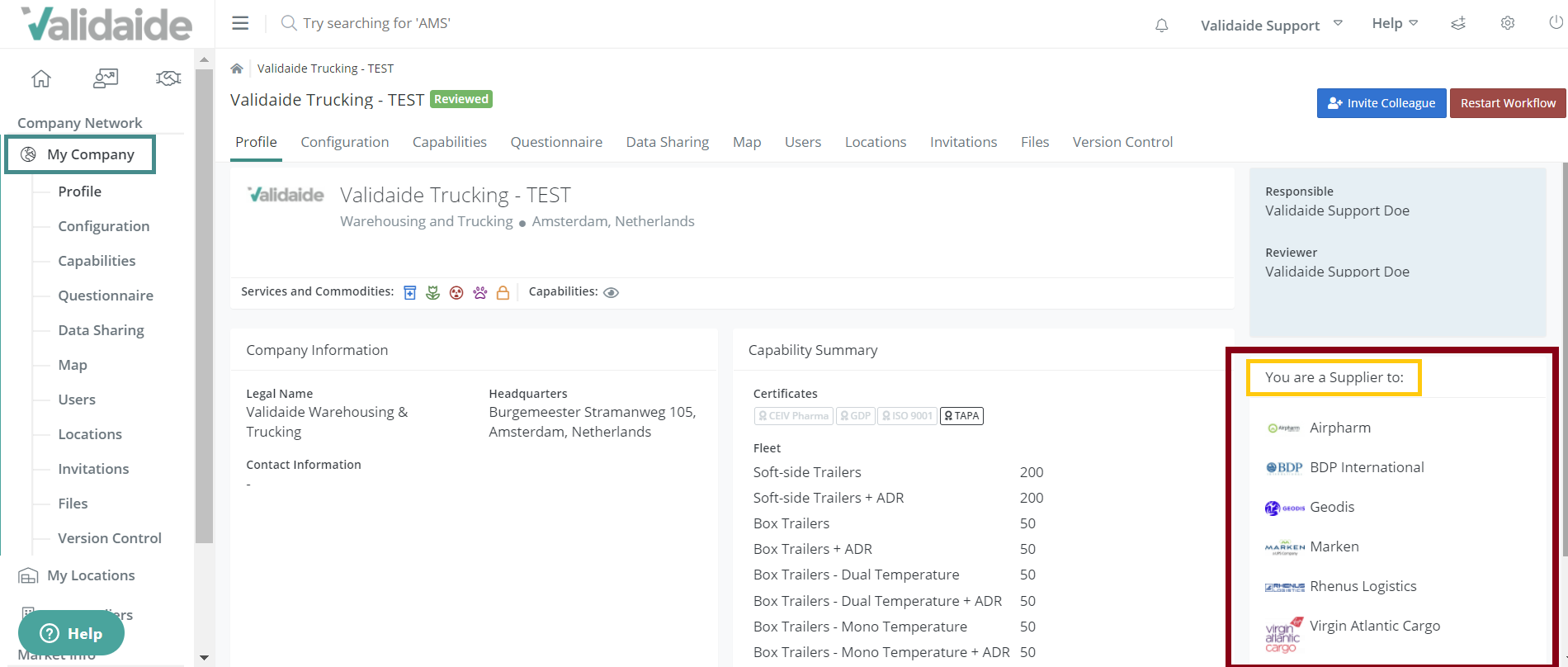
- A user can see which tenants have added its company as a supplier – Under My Company, it is now possible to see which tenants have added your company as a supplier.
- Trucking companies will be able to choose between private and public sharing – New functionality has been added for trucking companies offering the possibility to choose between private and public sharing.
More information in downloads
- The location overview download now has a column to indicate how many lanes a location is being used in and also Road Freight Capabilities configuration - Location Overview download is enhanced to include columns indicating the number of lanes a location is being used in and Road Freight Supplier Locations. The column ‘Road Supplier’ includes number for Road Suppliers and Road Supplier Locations.
- The Supplier overview download, now also includes how many lanes that supplier is being used at - In the Supplier overview download, a new column 'no. of Lanes' has been added to indicate how many lanes that supplier is being used in.
- The user overview download now includes a column for the user’s internal location reference number - The User file includes the Location Name of the Location of each User, in the new release a column for the Location Internal Reference has been added.
- Updated Location Download in Excel - It is now possible to download supplier location capabilities from different available views and also choose between standard or extended profile.
Possibility to select supplier locations and company locations as subcontracted Road Freight supplier
Now users can also select Supplier Locations and Company Locations as Road Freight providers in addition to selecting multiple Suppliers as subcontracted Road Freight suppliers for a Location.
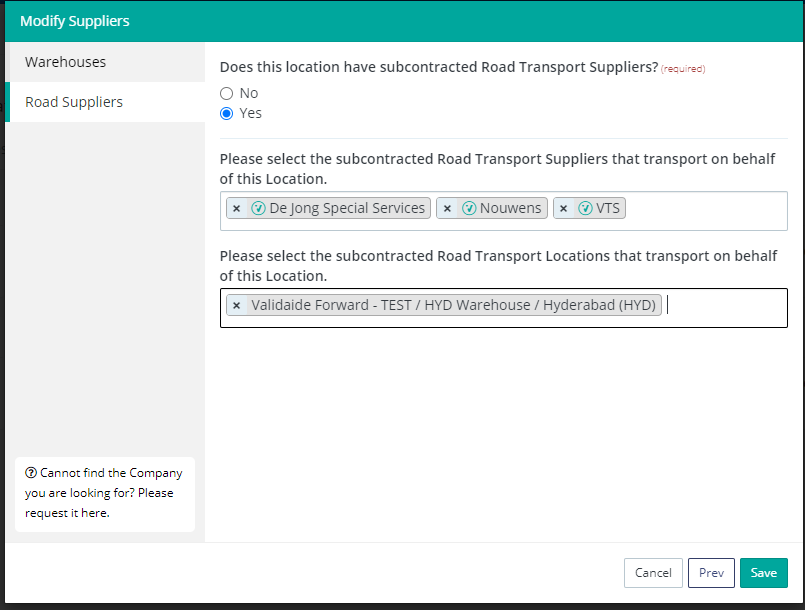
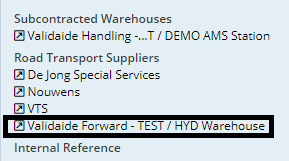
Selected Road Freight Supplier Locations are shown on the Location Profile page (below the Road Freight Supplier Companies)
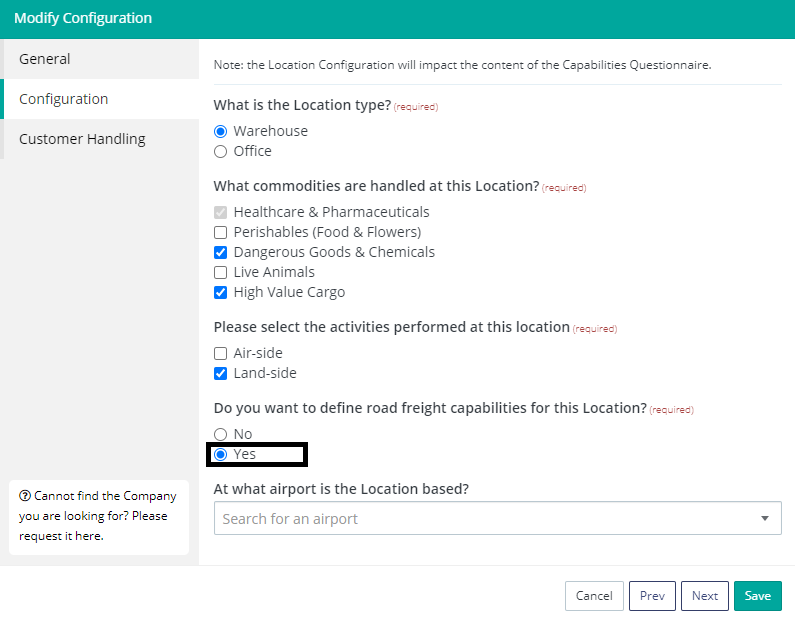
Please note: To choose a supplier location or a company location as subcontracted road transport location, The Location needs to be configured to provide Road freight capabilities. You can choose that in the general information of the Location's configuration page.
Also, note that you can only select other locations and not the same location in the 'subcontracted Road transport location' field.
Lane Manager
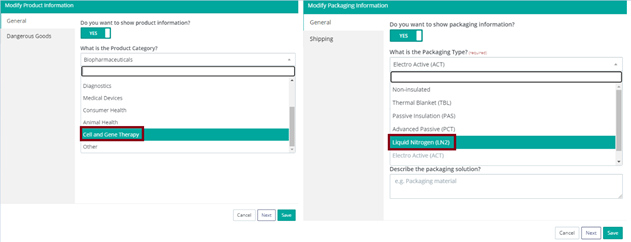
A new product category ‘Cell and Gene Therapy' and a new packaging type ‘Liquid Nitrogen LN2’ has been added - In the new release list of Product Categories in the Lane Configuration and SOP Configuration has been extended with "Cell and Gene Therapy". When selecting Cell and Gene Therapy as a product category a new packaging type has been added LN2 (Liquid Nitrogen).
Enhanced User Management
- An administrator can see a number of logins per month for each user - An Administrator can now see the number of Monthly and Weekly Logins for a User.
- An administrator can reassign roles and tasks with or without suspending a user – Currently, when suspending a user, the Administrator can see the number of open tasks and number of assigned Roles for this user.
In the new release roles and tasks can be reassigned to a new user or when suspending a user the Administrator must reassign these tasks to an active user. The roles will be reassigned to the new user, open tasks transferred and the newly assigned user will receive a notification of it. For some Roles and Tasks, it may not be possible to assign the selected user. Therefore there is a notification about the remaining Open Tasks and Roles which the Administrator has to manually reassign.
Please note that if you receive a Location or Company Sharing Request, but no (Responsible) User has been assigned to Location or Company - tasks to collect capabilities are not re-assigned, if Responsible User is assigned to Location or Company, their tasks and assignment are transferred.
- User-friendly enhancements when creating company locations - when creating a Company Location the user can define all Location configuration details, also Location Type must be defined. The user is asked: Do you want to start to define the capabilities of this Location?
- If the user selects YES, a Responsible and Reviewer must be selected. In this case, there will be no Start Workflow button.
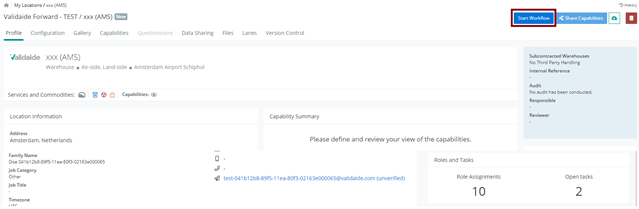
- If the user selects No, a Start Workflow button will appear. When clicking on this button the user must select a Responsible and Reviewer.
Button Define Capabilities for Company Location has been renamed to Start Workflow. The button Start Workflow has also been added to the new Version History tab under Company Location. The User must add a Revision Period, which must be a numeric value in months with a default value of 12 months. (Min 6, max 24 Months). After Starting the Workflow the state is changed to "In Progress"
- Creation of a reassigning date for tasks - In the new release when reassigning a task, a task creation date will show when it has been created and reassigned to another user.
- Updated the Expired Company / Location Capabilities email – A new layout for notification emails for Expired Company and Location Capabilities.
Bug Fixes
- If a supplier was in the Under Review state and a user sent a request to view Supplier View, the user encountered an error. This has been fixed. Now a User can Request a Supplier View of a Supplier when their company is not approved or under reviewed state.
- When a Location was configured for a Road Transport Supplier which did not have an indication of Tier level, an excel download of Supplier returned an error. This bug has been fixed and now it is possible to download an excel even if the configured locations do not have an indication of the tier level.
- When a Location was configured as a Pick-up or a Drop-off point in a Lane, that lane was not shown in that Location's Lane tab. This has been fixed and a user can now see lanes under the location’s lane tab.
- A user got an error if trying to remove a company location assigned as a Pick-up or a Drop-off point in a lane or an SOP. This error has been fixed. Now a user can remove the assigned company location.
- It was not possible to go to the lane from the lane’s listing page by clicking on a lane, nor clicking on the dots showed Lane’s dropdown list to be redirected to the relevant pages. This has been fixed. A user can click on the lane and the dropdown list to be redirected to the page the user has selected.
- The user was not able to navigate to the supplier’s location from the Supplier’s location tab to access the capabilities. This error has been fixed and now users can navigate to a Location from a Supplier’s location tab.
- Status of Supplier Location used in a lane is now displayed correctly.
- Road Transport Supplier(s) that are configured for a Company Location is shown as a link instead of plain text. This was a bug and has been fixed.
- The locations overview page is now loading without a delay.
- Several pages associated with lanes and locations that had to display negative temperature were throwing an error. This error has been fixed and now it is possible to open such pages.
- Supplier location excel download did not show correct progress of the standard and extended capabilities. This has been fixed.
- For a Lane, during the modify road step, the supplier view used in the step was not the one selected in the dialog of selecting views. This has been fixed. Now the view selected during the modify road step reflects the correct supplier view being used per step.
- Lanes by Customer, the dashboard has been fixed to only include the customer and not the owners. Also, the insights on Locations that show how many lanes a certain location is being used incorrectly displays the graph.
- Sometimes approvers of SOPs had pending tasks associated with an approved SOP. This has been fixed. Now approvers of SOPs in the ‘Approved ‘state do not have pending tasks to approve the SOP.
- Fixed UI of published articles in the What's new section.
Comments
0 comments
Please sign in to leave a comment.