
Introduction
In Release 4.2 we include the following enhancements:
- Ferry Crossings for Road Steps
- Various functional enhancements
- UI/UX improvements
- Bug fix
Ferry Crossings for Road Transport Steps
We continue to further enhance our functionality to document and asses road transport in Validaide. In R4.1 we added the documentation of Border Crossings, and in R4.2 we now add the documentation of Ferry Crossings during Road Transport. The functionality for Ferry Crossings is similar to Border Crossing, as both options can be added within an existing Road Transport step in the Lane Configuration.

For each Ferry Crossing the user can document relevant information such as the ferry operator, the origin and destination ferry terminal, as well as the duration of the waiting time at the origin terminal and the duration of the ferry crossing. This information will be shown in the Lane Timeplan and PDF report. However, the ferry crossing will have no impact on the Lane Assessment.

In our next release we plan to further enhance the Road Freight functionality by also adding the documentation of parking stops during road transportation.
Additional functional enhancements
This release also includes the following small functional enhancements:
- Change the order of SOP Contact Groups - it was already possible to change the order of SOP Process Descriptions, and this is now also possible for SOP Contact Groups (see screenshot below).
- Distance indication of manual flight schedules - In the Lane Overview we indicate the total distance of a Lane. For flights this is derived from the flight schedule, and for flights schedules that are manually added to Validaide the flight distance was not documented yet. This is now also possible, will from now on always be added to manual flight schedules.
- Lane and SOP Sharing with Packaging Providers - For each Lane or SOP it was already possible to indicate the Packaging Manufacturer, and now it is also possible to share a Lane or SOP with this packaging manufacturer. As a result, the Packaging Manufacturer is now defined in the Parties form.
- Indication of remote or on-site audit - In Validaide it is possible to indicate if a Supplier has been audited. Now it is possible if the audit was on-site or remote, due to the increased number of remote audits since the start of the corona pandemic.

UI/UX improvements
We continuously aim to further improve the design and experience of the Validaide application, for example by creating more consistency. In R4.2 we implement the following improvements in this area:
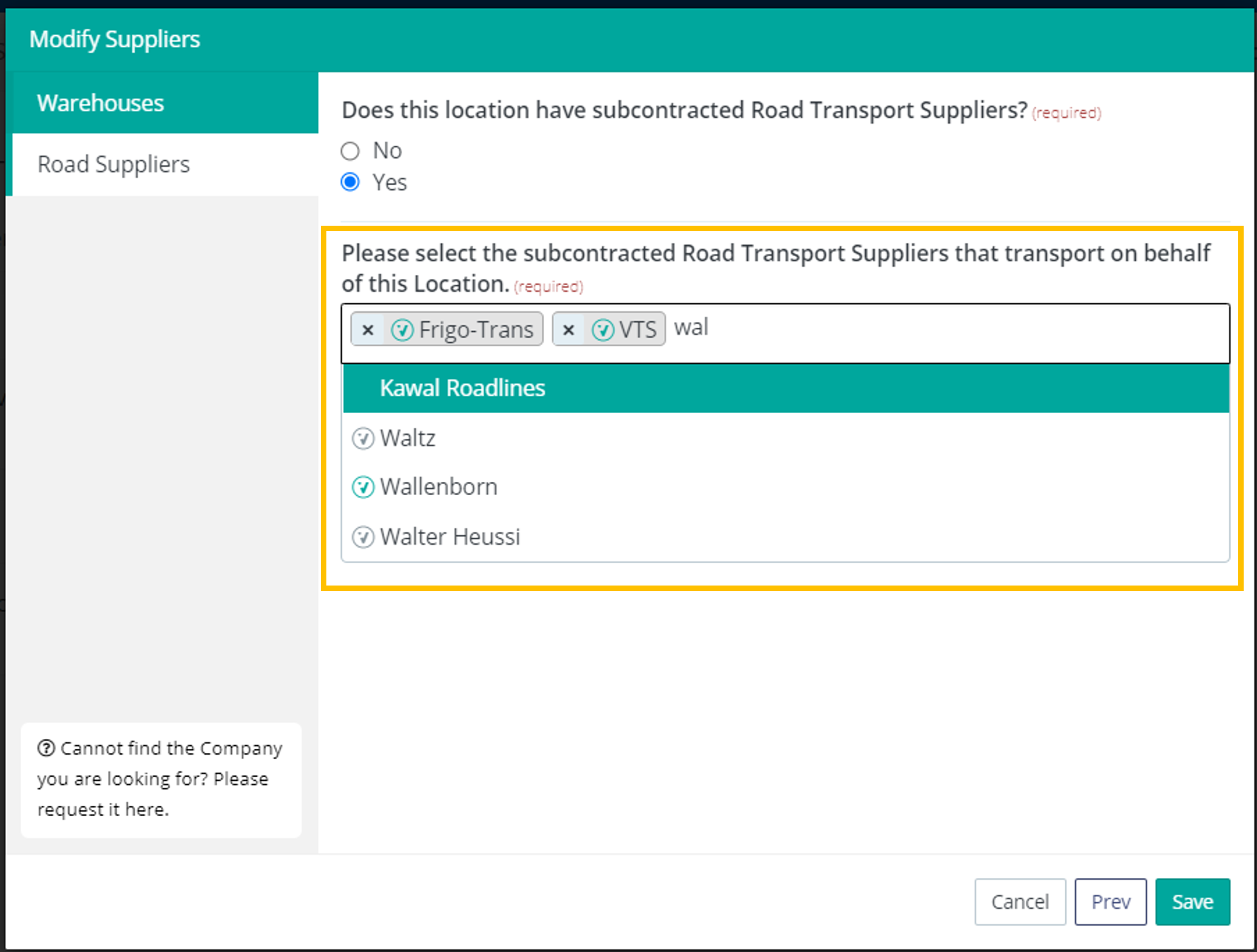
- Consistent multi-select for Location Road Suppliers - for each Location a user can indicate the relevant road suppliers. The form to define these road suppliers has been modified and made consistent with other multi-select forms. As a result, the "Add Company" button in the form is now removed (see screenshot below).
- Consistent configuration of Lane Comparisons - The editing of Lane Comparisons, including adding Lanes to a Lane Comparison, is now consistent with the approach for Lane SOPs. As a result, we provide a new Configuration screen for Lane Comparisons. In addition, we now show a history of Lane Comparisons, which indicates which user created and last modified the Lane Comparison.
- Update of User Profile with new form - almost all editing of information in Validaide is done in forms. The User Profile was an exception, and this is now made consistent with a new form. This can be accessed from the User Profile screen with the Modify Profile button or pencil icon.
Bug Fix
- Issue with Lane Configuration for FRO Booked Temperature - In Validaide it has not been possible yet to select Frozen (FRO) as booked temperature for air and ocean shipments. However, a bug was introduced to allow the user to select this, which caused on error on the Lane. This has now been fixed by disabling FRO as booked temperature, and setting this to COL (2-8) for impacted Lanes. In a next release we plan to provide functionality to enable users to select FRO as booked temperature for air and ocean Lanes, including the evaluation in the Lane Assessment.
Comments
0 comments
Please sign in to leave a comment.