
The next step in digital collaboration for Lanes and SOPs
With Release 4.0 we take the next step in digital collaboration for Lanes and SOPs between supply chain partners in pharmaceutical logistics, as we introduce the following enhancements:
-
Multi-party sharing and collaboration on Lanes and SOPs- You can assign companies in multiple roles as a Party on a Lane or SOP, with external approvers. For SOPs you can now also assign external contributors at external companies.
- Enhanced Lane Configuration Options - We provide more configuration details to provide flexibility to customize Lanes to your needs. In addition, we provide enhanced Lane filtering and updated the Lane Configuration for consistency across the application.
- Lane SOP Improvements - We implement various enhancements, such as improved formatting and changing order of Processes, an Effective Date, and SOP overview download. You can now also better copy/paste content from Word/Excel files for easier migration of existing SOPs.
You can watch an overview of the enhancements in this 8-minute video:
Multi-party sharing and collaboration on Lanes and SOPs
With this Release, the company that creates a Lane or SOP automatically becomes the Owner and can assign other companies in multiple roles, such as Shipper, Forwarder, 4PL or Primary Carrier. The Owner can then also share the Lanes or SOPs with these parties, enabling multi-party sharing and bi-directional sharing.
The sharing of Lanes and SOPs can be started in the new Data Sharing panel in the Configuration screen:

In addition, the number of External Approvers you can assign has been increased from 2 tot 4 users.
We also introduce new role for External Contributors, which will make it possible for Shippers and Forwarders to jointly edit SOP sections, for example for each party to editing their own Contact Details. These External Contributors can edit the Contacts and Process sections in a Shared SOP and also upload Files to the SOP. However, these External Contributors cannot change the workflow, such as Submit for Review. This can only be done by the Responsible User of the Company that is the Owner of the SOP.
You can read more about multi-party sharing and the approval workflow with external contributors.
Enhanced Lane Configuration
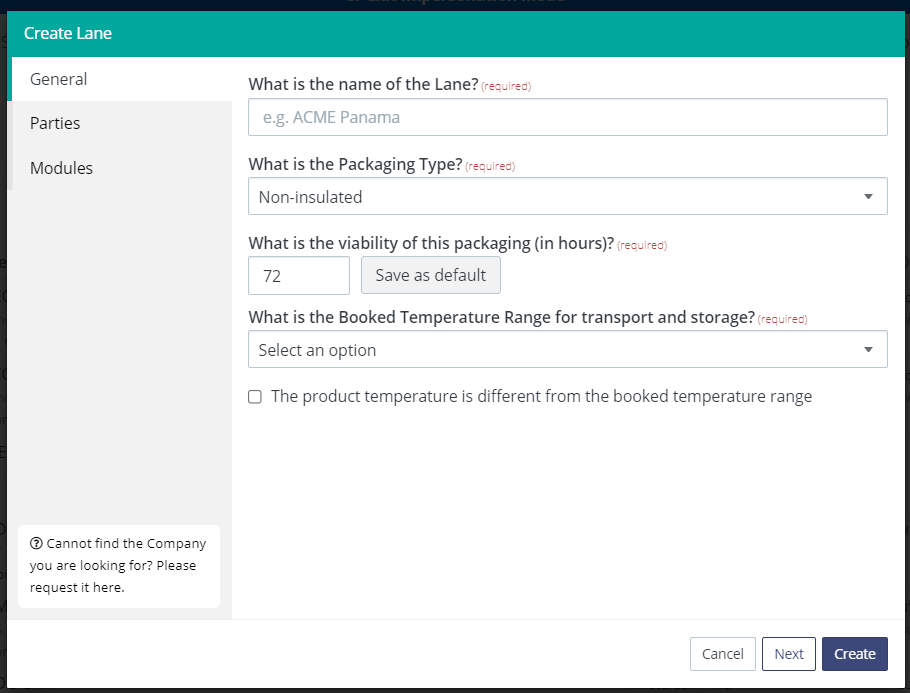
The Create Lane form has been simplified. You can now enter only the mandatory fields, and all optional fields can be added in the Lane Configuration screen. You can also directly click Create from the first General form.
After the Lane Creation, you can now add more details to a Lane in the Lane Configuration screen, which are added as optional fields. The Lane Configuration screen has also been redesigned with panels to be consistent with the SOP Configuration and other configuration screens. You can now define the following details for each Lane:
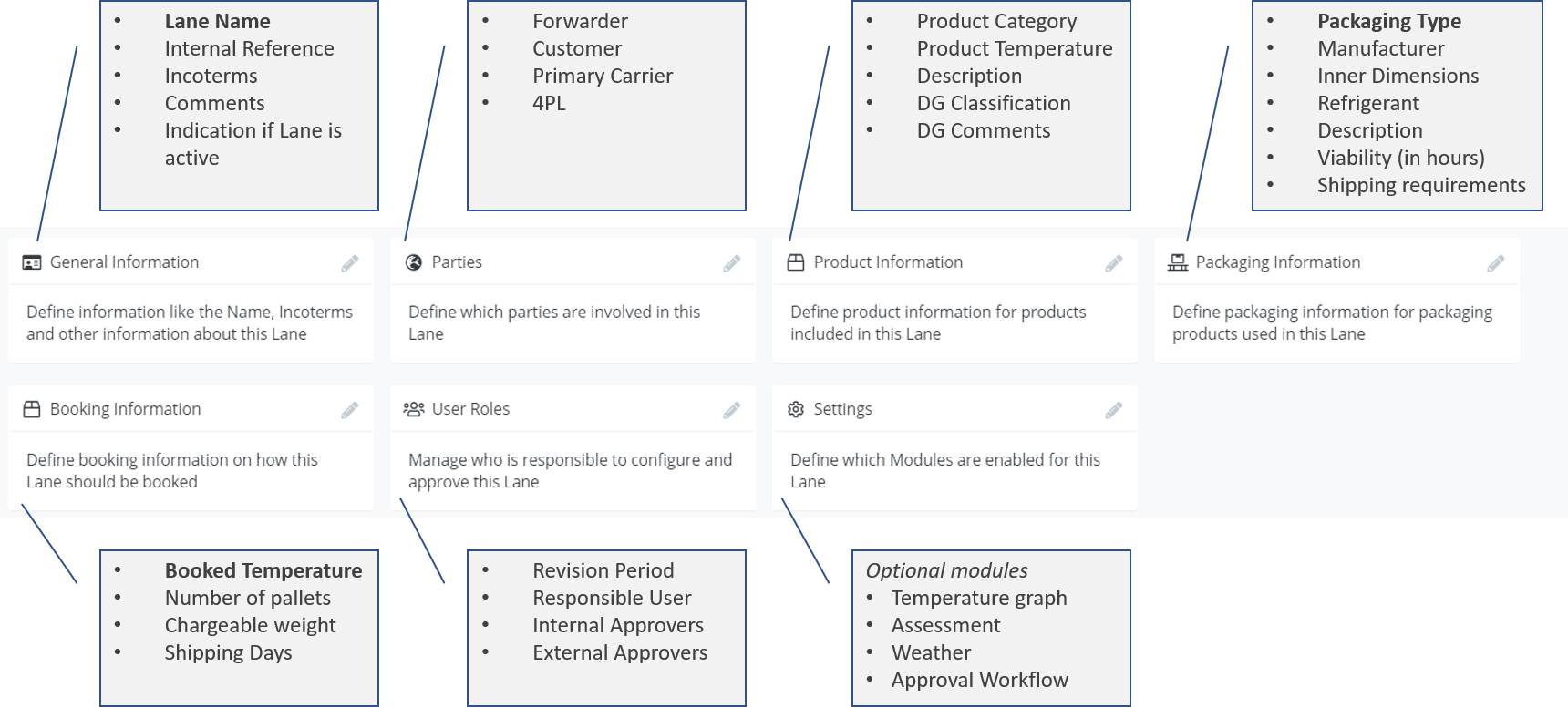
This includes various new fields such as:
- Indication if a Lane is actively used for transportation
- Additional optional parties, such as 4PL.
- DG Classification of the product
- Booking details, such as Number of Pallets, Chargeable Weight, and Shipping Days.
In addition, the Lane Listing screen has been redesigned to display additional information per Lane, and additional filtering options on the following fields:
- Creator - The user that created a Lane.
- Active - Indication if a Lane is actively used for transportation.
- Is Being Shared - To filter Lanes that you share with external Parties.
- Owner - The Company that is the Owner of the Lane.
- SOP - To filter Lanes that a part of a specific SOP.
- Involved Party - Companies in a specific role on a Lane, e.g. Customer or Forwarder.
- Internal Reference and Description - Search text fields now includes Reference and Description.
Lane SOP Improvements
The SOP Listing now provides additional filter options and a CSV Download option with SOP overview for further analysis
For each SOP we offer the following enhancements:
- Add SOP Effective Date / End Data
- Large comment field with formatting options to add additional custom information
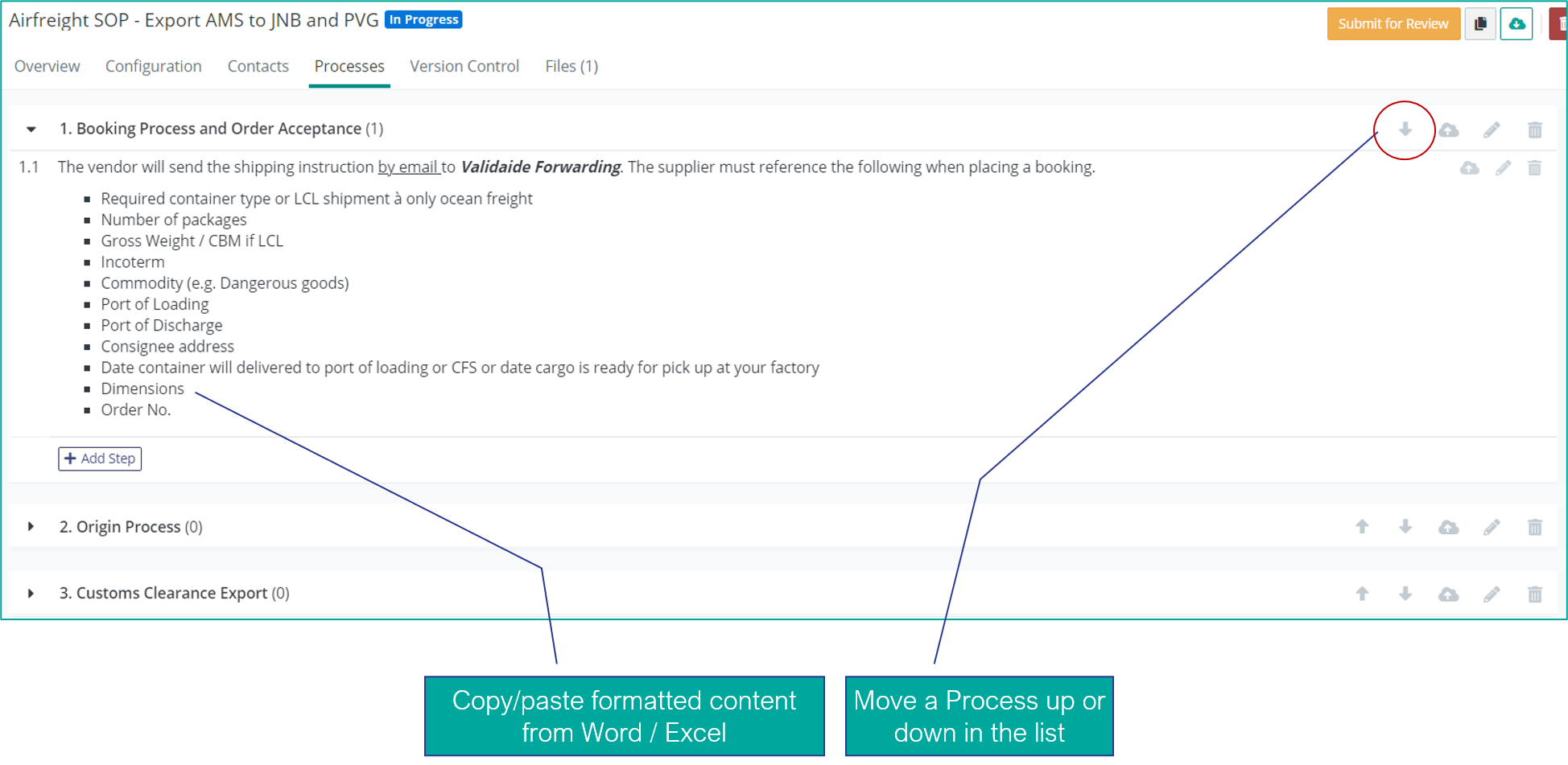
- Change the order of SOP Process Descriptions
- Improved formatting of SOP Process Descriptions, e.g. to change the font size
- Improved copy/paste content from Word/Excel files for easier migration of existing SOPs. For example, you can now copy bullet point lists and numbered lists into Validaide.
You can read more how to create a SOP, configure a SOP and edit SOP process descriptions.
Comments
0 comments
Please sign in to leave a comment.