
Introduction
With Release 3.0.0 we introduce various functional and design enhancements to Validaide:
- Update to Capabilities Checklist
- Stronger separation between Standard Profile and Extended Profile
- New Configuration page for Locations and Suppliers
- Documentation of Quality Agreements with Suppliers
- Enhanced User Authorization Management
- Optional Categorization of Locations
- Lanes Dashboard for forwarders
Furthermore, our application is now validated in accordance with GAMP 5 Guidelines. Various validation documentation have been created and will be maintained with each incremental release. You may contact support@validaide.com for more information on this topic.
1. Update to Capabilities Checklist
With this Release we implement our first upgrade to our Capabilities Checklist. Based on market feedback we have added and removed various questions, and also enhanced our Capabilities Checklist to cover five groups of commodities:

- Healthcare & Pharmaceuticals
- Perishables
- Dangerous Goods
- Live Animals
- High-value goods
What you are requested to do:
- Please configure your Company Locations and Company to indicate which commodities are handled. Based on this configuration the content of the Checklist will be adjusted, so a warehouse that does not handle Perishables will not have any questions for this commodity.
- Update the Capabilities with the new Checklist. This will ensure your capabilities are up-to-date and your customers can make Lane Assessments with all required information.
Impact on Lane Assessment Algorithm
The updated Capabilities Checklist also has some impact on the Lane Assessment algorithm, for example due to some new core capabilities. Also the impact of certain certifications has changed. For example, a Wholesale Distribution Authorization (WDA) now defines Pharma Quality directly as Excellent. These updates are not directly applied to each Lane, as we put the user in control for the updates. Therefore the Lane must be manually refreshed to apply the new changes. More information will be provided separately to forwarder users.
2. Stronger separation between Standard Profile and Extended Profile
In our application we already distinguished between core questions and informational questions, in which the core questions are used in our Lane Assessment algorithm. This is now further separated:
- Standard Profile: includes the core questions that are used for Lane Assessments.
- Extended Profile: includes the core questions and additional informational questions.
When you are defining your capabilities you can decide to fill in the Standard Profile or Extended Profile, and also see the current setting in the Questionnaire and Compare pages. You can switch by clicking on the Pencil icon or in the Configuration page.

In general, we request Ground Handling Agents to fill in the Extended Profile, whereas it may be sufficient for air carriers to fill in the Standard Profile for their network stations.
For more details, click here
3. New Configuration Page
We now provide a new Configuration page for Locations, My Company and Suppliers. With this page you can easily define and configure all relevant information. This page is available to authorized users, which are the Responsible User, Reviewer and Administrators.
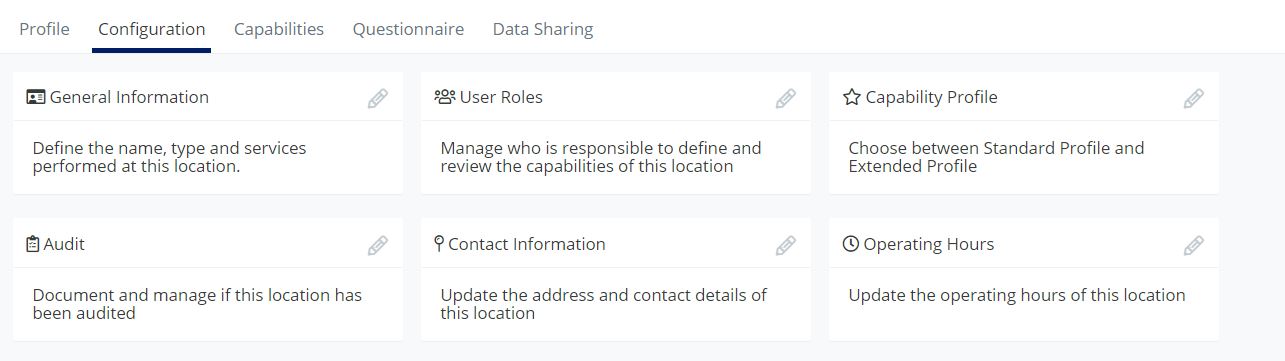
For more details, click here (for location level) or here (for company level)
4. Documentation of Quality Agreements with Suppliers
It is now also possible if you have a Quality Agreement or Technical Agreement in place with a Supplier or Supplier Location. This information can be added in the Configuration page for the Location or Supplier, with additional details such as the date of signing.
If you have this information defined, this will be illustrated in the Location profile and page header.
5. Enhanced User Authorization Management
We now provide companies more control to define specific user authorization features. This is implemented with various settings in the administrator menu, where the following settings can be defined:
- Who can invite new users: you can now indicate if all users can invite new user accounts, or if this is restricted to Administrators only or Administrators and Editors.
- Who can create Company Locations: you can now indicate if the creation of Company Locations is restricted to Administrators, or available to both Editors and Administrators.
- Assignment of Responsible and Reviewer: you can now indicate if it is allowed that the Responsible User and Reviewer can be assigned to the same user account.
All these settings can be defined in the new Settings menu item in the Administrators menu
For more details, click here
6. Optional Categorization of Locations
It is now possible to categorize Locations based on their Level of healthcare competence, in which a level from 1 to 4 can be assigned to a Location. This is optional functionality that is disabled by default, and it can be enabled in the Settings menu in the Administrators menu.
For more details, click here
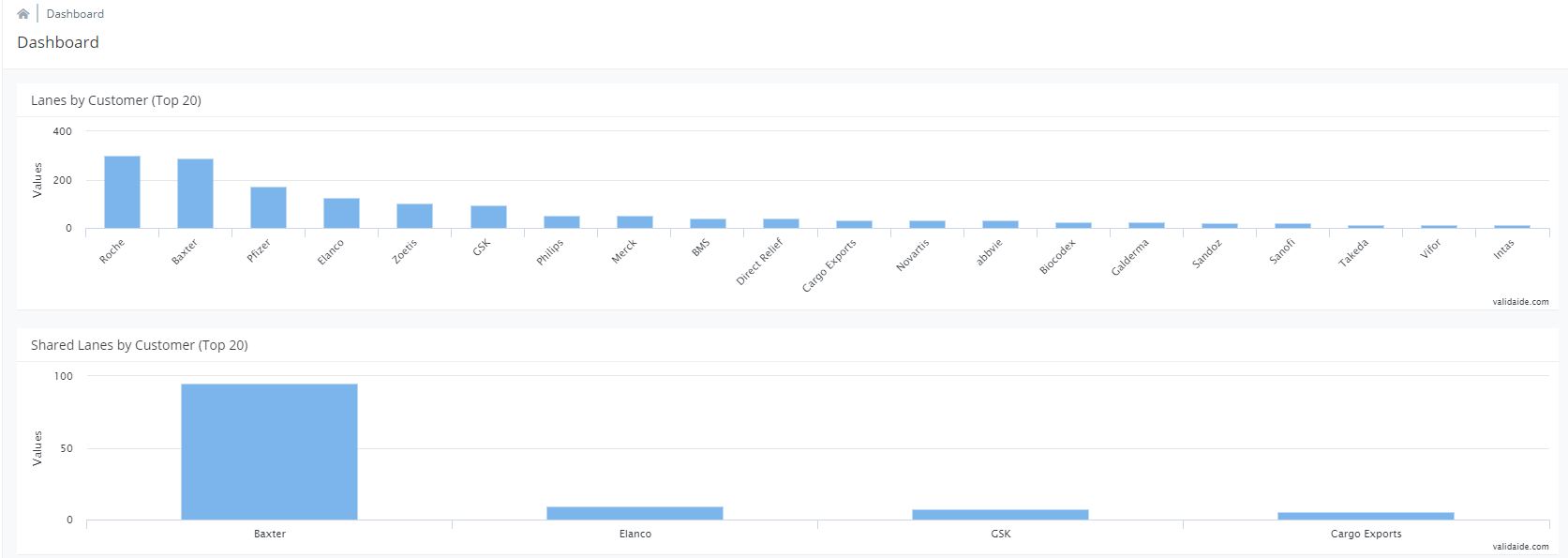
7. Lanes Dashboard for forwarders
Forwarder users now have access to a new Dashboard that provides insights into the number of Lanes per Customer, as well as the number of shared Lanes per Customer:
Comments
0 comments
Please sign in to leave a comment.