
Introduction
With Release 2.6 we have implemented the following improvements:
User Management: we now let companies restrict which user types can invite new users within their company. Currently all users can invite their colleagues, but this can be restricted to Editors and/or Administrators. In addition, we now provide a download of all user accounts and send an email to suspended users.
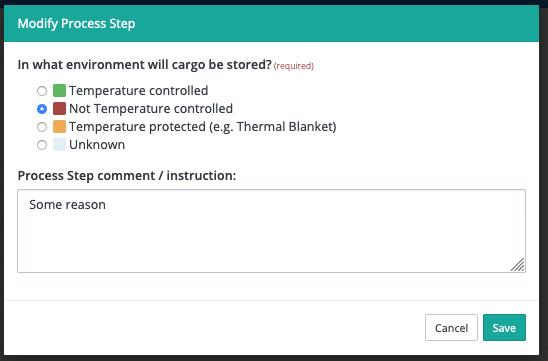
Indication of Temperature Controlled Environment: In the Lane Configuration the user can now manually indicate if cargo is stored or handled in a temperature-controlled environment, to overwrite the capabilities of the location. For example, a warehouse has a cold room available, but cargo is not stored in this area but it stored in a cage or vault for security reasons.
Flight Search: our flight search could show old flight schedules which are no longer active. We have implemented a process that will periodically clean-up these old flight schedules, so that our Flight Search becomes more accurate.
New Features
- An Administrator can indicate which User Types can invite new users. - This makes it possible for companies to restrict the invitation of new users within their company. In the Administrator panel, an Administrator can indicate which user types can invite new users:
- Administrators only
- Administrators and Editors
- All Users
Based on this selection, the Invite Colleague functionality is only available to authorized users.
- An Administrator can create a CSV download of all users within his Company with status and last login. In the Administrator menu for Users we have added a download option to download an overview of all users with status and last login date.
- A User receives an email when his account is suspended or unsuspended. Suspended and unsuspended users will now receive an email to inform them about the suspension.
- A User can indicate if a Company Location has been audited. In addition to existing functionality for Supplier Locations, it is now also possible to indicate if an internal audit has been conducted for a Company Location.
- A User can modify the Temperature Exposure setting of a Lane Process Step. In the Lane Configuration it is now possible to define if cargo is handled or stored in a temperature-controlled environment (see image below). This information is normally derived from the Location Capabilities, but can now be overwritten.
Other improvements
- Implement a cronjob that will periodically clear the cached FlightGlobal Flights . We now periodically clean-up old Flight Schedules to prevent showing flights that are no longer active.
- Make Location Internal Reference unique - We have added a check to ensure that the Location Internal Reference is unique.
Bug fixes
The following bugs are also fixed in this release:
- When I download a Lane Characterization PDF the Disclaimer Box is moved to the next page and overlaps the text.
- When adding a company location, a user cannot complete the location configuration details in the pop-up window, an error message shows up upon clicking on save.
- When on the Market Info > Location > Capabilities a user cannot select all views
Comments
0 comments
Please sign in to leave a comment.