
In the Contacts tab you can edit the contact details of different contact groups.
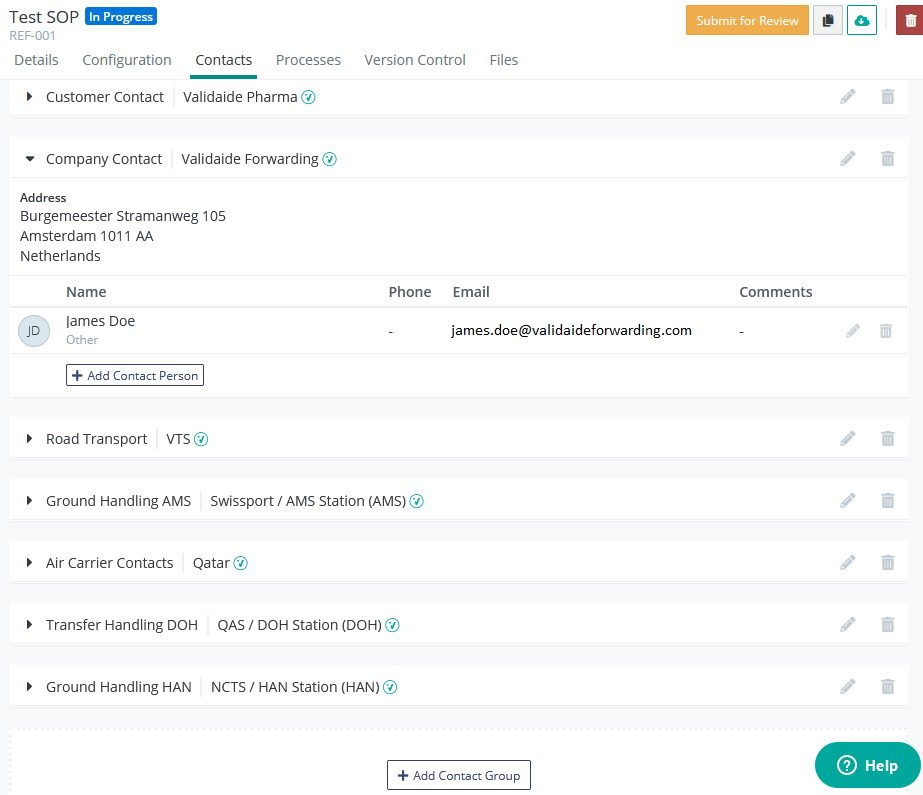
By default you have the contact groups for your company and for your customer already added.
In case you have added Lanes to the SOP, the contacts of the GHAs, air carriers and road transporters are automatically added to the contact details in the Contact tab.
 Please note that if you later remove a lane, the contacts for it are not removed automatically.
These groups can all be edited and removed in a flexible way, according to your needs with the corresponding pencil and trash can icons on the right  .
.
New Groups can be added easily with the Add Contact Group at the bottom of the page  .
.
Within contact groups, you can also flexibly edit the contact persons - modify, remove or add more.
If a contact person is a Validaide user you can select it from a drop-down list and their contact details (phone, email) will be filled in automatically if available in the system. If they are not on Validaide you can still add them manually.
Comments
0 comments
Please sign in to leave a comment.